The Circle
Circles are among the hardest simple geometric shapes to draw in isometric view. When transformed into an isometric view, circles become ellipses. In order to draw the ellipse, we need to determine the x and y radii using the provided radius as a reference. By transforming the x and y coordinates of the radius at a 45 degree angle, we can get the coordinates for the isometric radii and create our ellipse (figure 1).
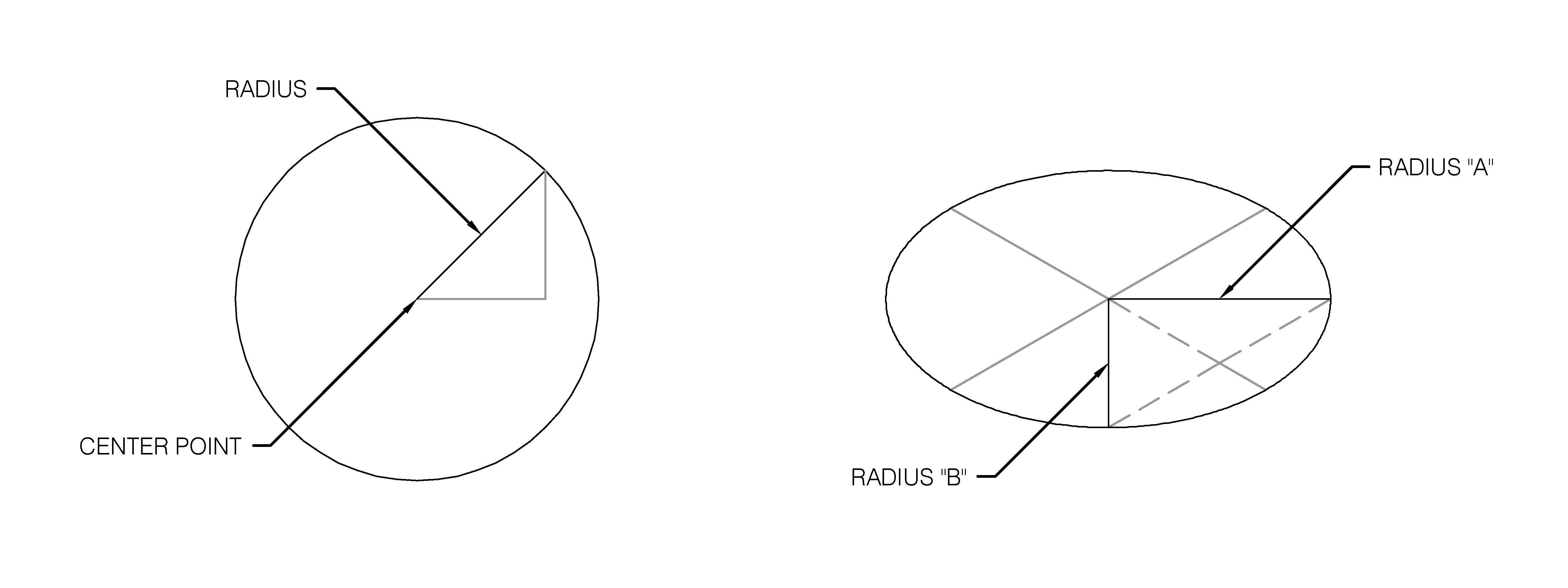
Then it becomes fairly easy to build out the ellipse. Here we also show the method for putting it on different axes of the isometric x-y-z view:
 (setq axis1(getstring "\n Horizontal/Vertical axis:"))
 (setq rd2(getdist "\n Radius:"))
 (setq rd2 (* rd2 (sqrt 2)))
 (if (or (= axis1 "H") (= axis1 "Horizontal") (= axis1 "horizontal") (= axis1 "h"))(progn
 (setq pte1 (list (+ x1 (* (cos a1) rd2)) y1 0))
 (setq pte2 (list x1 (+ y1 (* (sin a1) rd2)) 0))
 )
 (progn
 (setq pte1 (list (+ x1 (* (* (cos a1) rd2) (sin a1))) (+ y1 (* (* (cos a1) rd2) (cos a1))) 0))
 (setq pte2 (list (+ x1 (* (* (sin a1) rd2) (sin a5))) (+ y1 (* (* (sin a1) rd2) (cos a5))) 0))
 )
 )
 (command "._ellipse" "c" pt1 pte1 pte2) ;draws ellipse
Where a1=30 degrees, a5=60 degrees. Note we also show the Horizontal/Vertical Axis selection to cut down on steps.
We’re solving for the sides of the 45 degree triangle formed by the radius, and then converting that right triangle into an obtuse 120 degree triangle in isometric view in order to solve for the lengths of the ellipse radii. Once we know where those two radii are located, it becomes a simple matter of drawing the ellipse.
And that’s it! Thank you for sticking through it, or if you haven’t seen the previous posts, check them out!